They arrive after hours
Someone asks for a move-out clean at 8 PM. By the time you call back tomorrow, they may have booked someone else.
For cleaning company owners
Kreova builds the app behind your cleaning business: quote requests, clients, recurring cleans, cleaners' schedules and invoices. Then an AI calls every new quote request within seconds.
Sound familiar?
Someone asks for a move-out clean at 8 PM. By the time you call back tomorrow, they may have booked someone else.
Every callback is time away from the work, and some requests never get one.
Texts, a spreadsheet, a calendar and a stack of invoices. Nobody sees the whole week.
How it works
One app runs the whole path. Kreova builds it from your description, and you can change any part of it by asking.
A real example
This is not cleaning software you rent and then work around. Kreova builds your own app from your description, so it follows your services, your prices and your rules. Here is one it built on October 29, 2026 for Brightside Cleaning, a made-up company, from the prompt further down. Every client, job and invoice in the pictures is sample data.
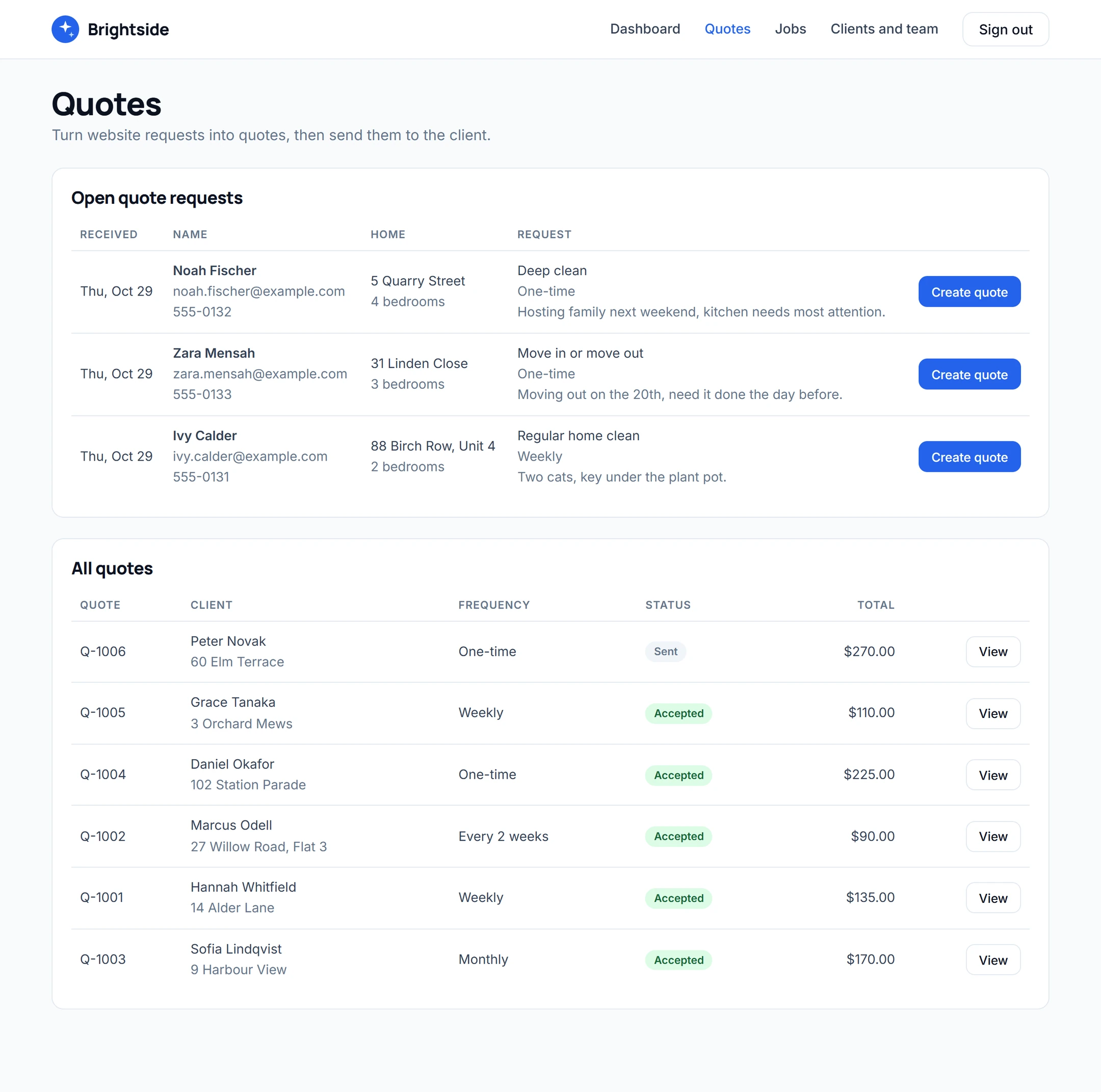
Requests arrive from the form on your website. You turn each one into a quote with line items and send it. The client accepts it in their own portal and picks a preferred day, and the job is created from the quote: one-time, weekly, every 2 weeks or monthly.
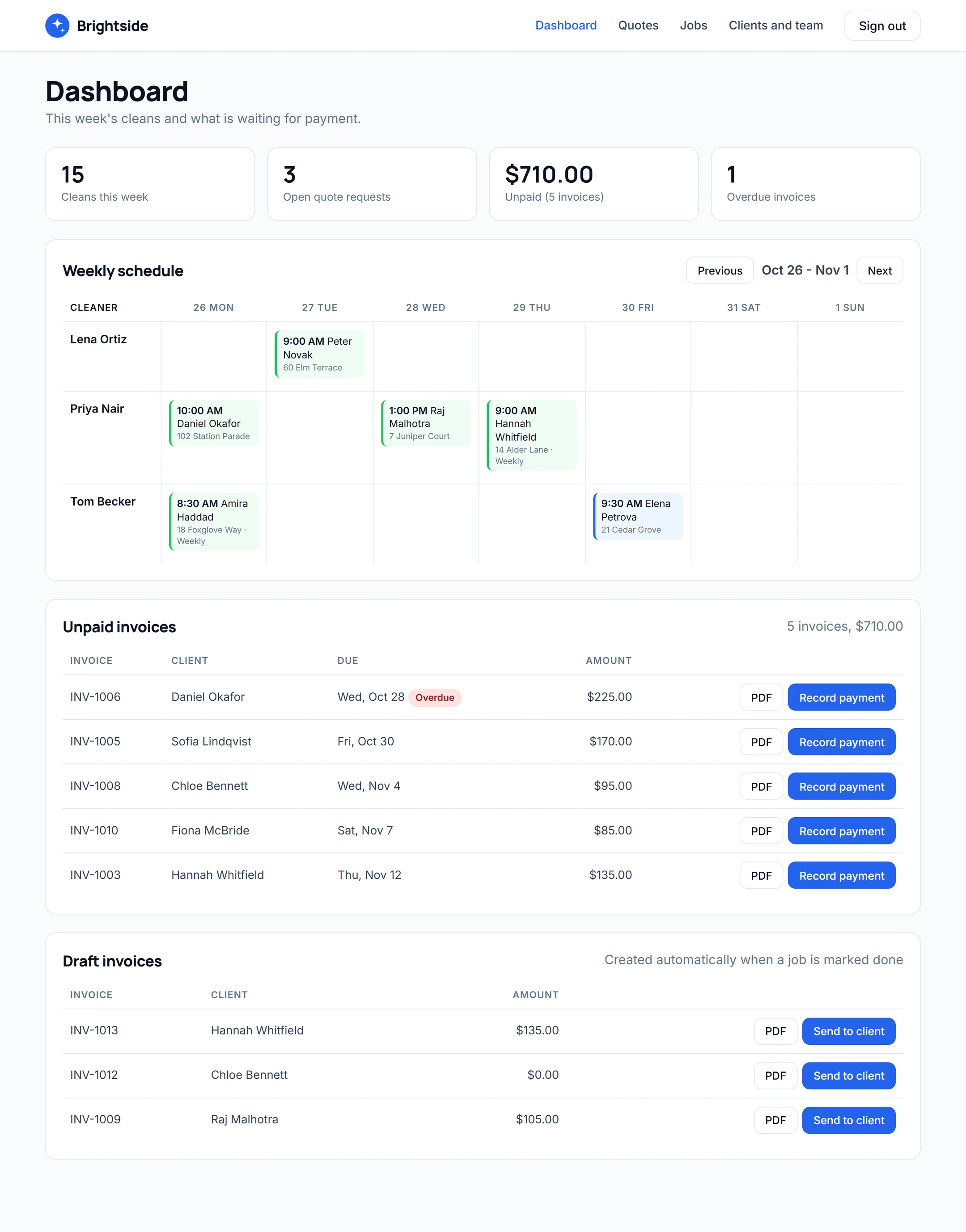
The owner sees the week's schedule for each cleaner, assigns cleaners to jobs and sees what is waiting for payment.
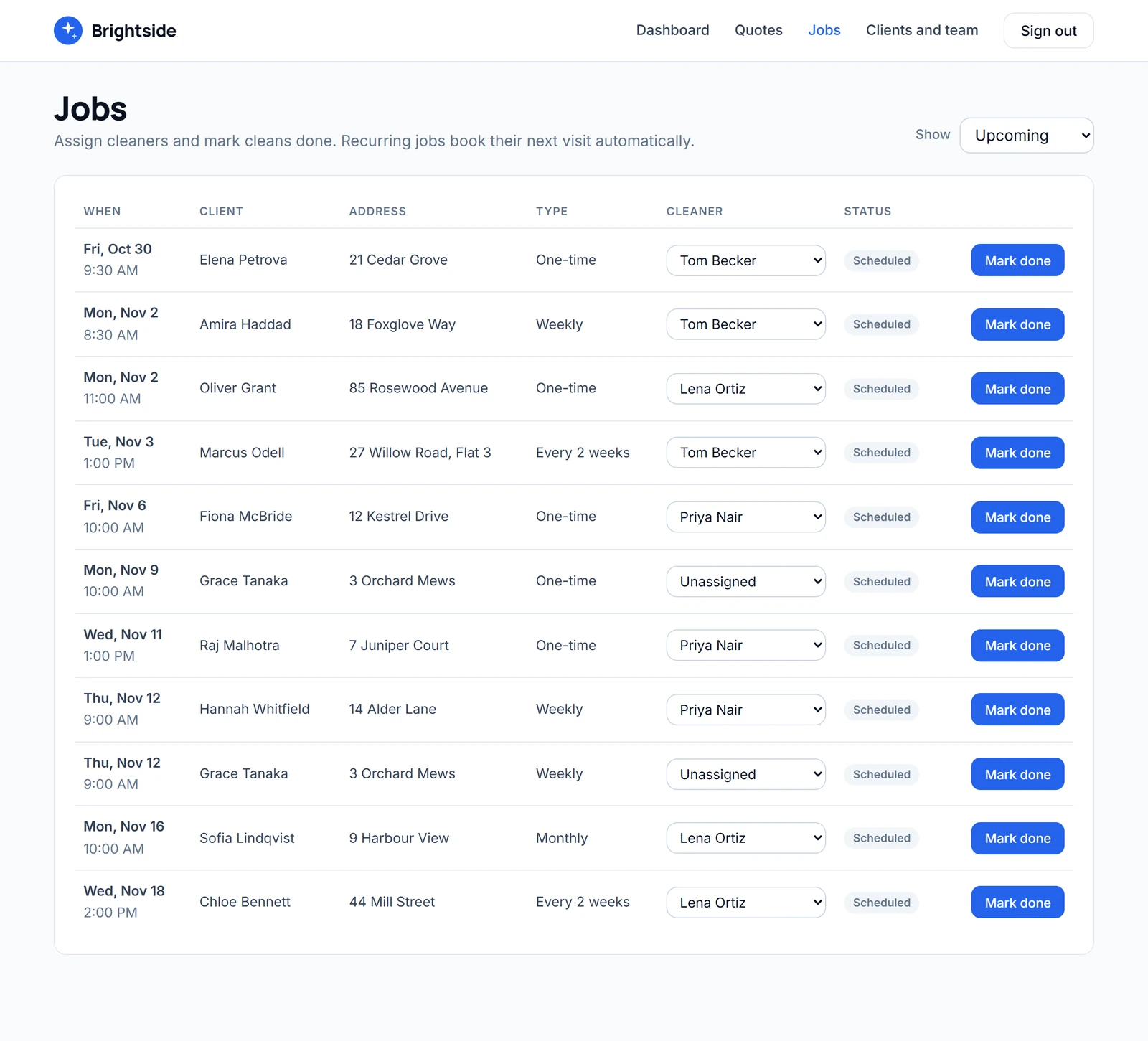
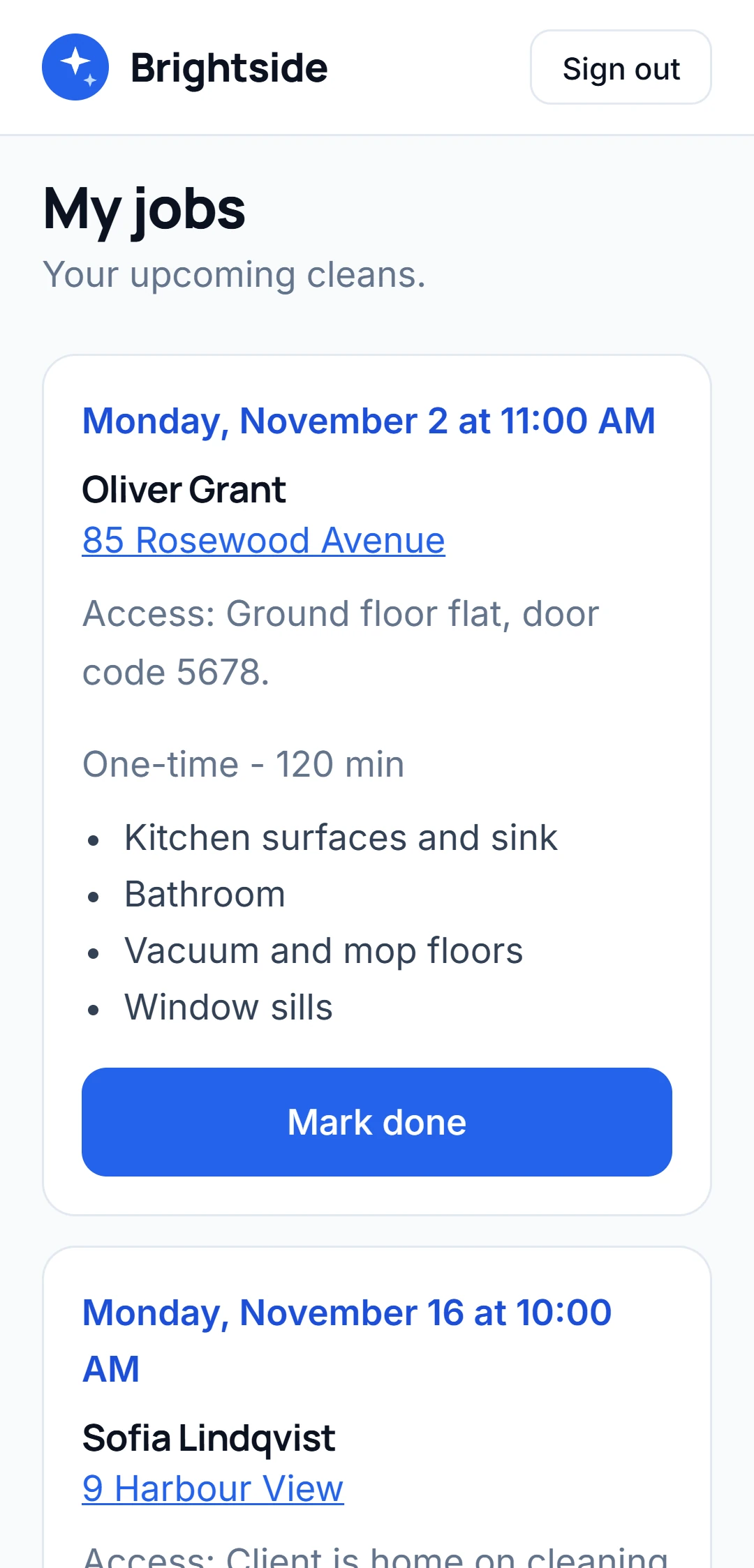
When a clean is marked done, the next visit of a regular clean is booked with the same cleaner, and a draft invoice is made from the quote's prices. We tested it in this app: a weekly clean marked done booked the next one 7 days later, and its invoice carried the quote's two lines.
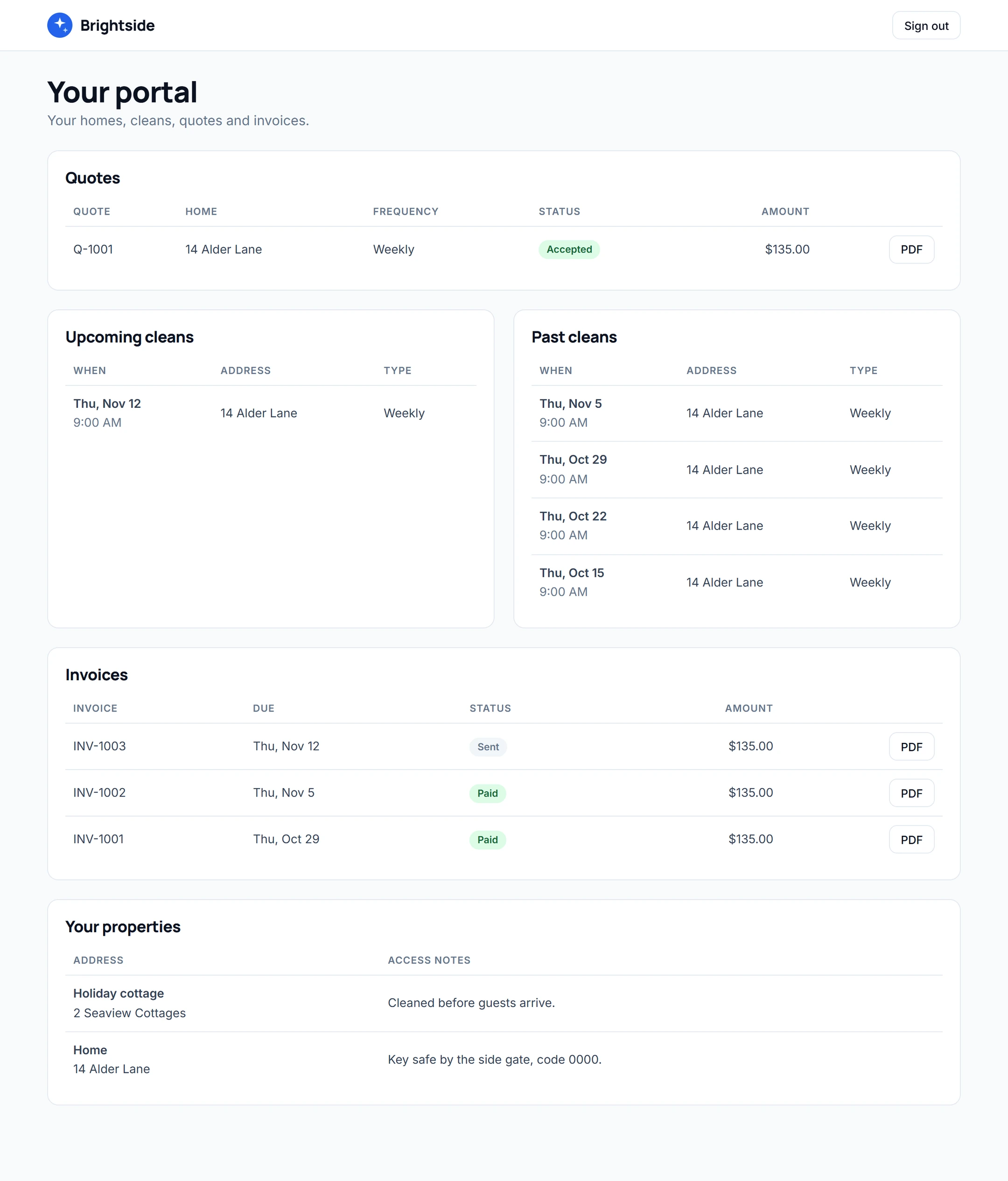
| Role | Sees | Can do |
|---|---|---|
| Owner | Everything: requests, quotes, jobs, the schedule, clients, cleaners and invoices | Quote, assign cleaners, mark cleans done, send invoices and record payments |
| Cleaner | Only the jobs assigned to them | Mark their own jobs done |
| Client | Only their own homes, cleans, quotes and invoices | Accept a quote and download their PDFs |
These rules are kept on the server, not only in the page, so hiding a button is never the only protection.
The Brightside prompt
Build a cleaning company CRM for "Brightside Cleaning" with customers, their properties, quote requests, quotes, one-time and recurring jobs, cleaner assignments, invoices with PDFs, and payments marked as received.
Kreova built it in five rounds of about three minutes each, using four build credits. The AI calls below are a separate step on Pro.
The AI call
It answers from your own services and prices, and books the clean when she says yes.
AIHi Sarah, it's Bright Home Cleaning about the quote you just asked for. Is now a good time?
SarahYes! It's a move-out clean, two bedrooms. Do you bring your own supplies?
AIWe do, everything is included. A two-bedroom move-out clean takes about four hours.
AII have Thursday at 10 AM or Friday at 1 PM. Which suits you?
SarahThursday at 10, please.
AIThat's Thursday at 10 AM at 22 Oak Lane. Shall I book it?
SarahYes, book it.
Asked about supplies (included). Booked Thursday 10 AM after a read-back.
AI calls are on Pro and Power, with your own Telnyx account for the phone number.
The whole business, one app

Who cleans where, today and every week. Your team sees their own jobs when they sign in.

Weekly and monthly clients repeat on their own, with a reminder before each visit.

Each client has a login to see their cleans and invoices. You see who owes what at a glance.
Three steps
Start from the sentence above, or say it your own way: your services, your team, how you quote.
Pages, client logins, the database, schedules and invoices, built together and live on its own address.
On Pro, connect your phone number and the AI starts calling new quote requests. Test it from your browser first.
Pricing
$0/ month
Build your cleaning app and run it on a free krva.cc address. 5 build credits a month, no card.
$29.99/ month
Your own domain, Phone & SMS with your Telnyx account, the AI calls and GoHighLevel. 20 build credits a month.
$79.99/ month
Everything in Pro with 60 build credits a month, for owners who keep improving the app.
Paid separately and directly, only if you use them: your own Stripe account to take card payments in the app, your own Telnyx account for the phone number and calls, and your own domain.
No. Without it, the AI still calls each new quote request, answers questions and saves the job details and the time they'd like, so you can confirm it. With GoHighLevel connected, it books the clean straight into your GoHighLevel calendar.
Only people who ask for a quote and tick that you may call them, between 8 AM and 9 PM in their time zone. Anyone who says "stop calling me" goes on your do-not-call list.
A Pro or Power plan and your own Telnyx account for the phone number. You pay Telnyx for the number and call time directly. You can try the AI from your browser before it calls anyone.
Yes. Clients can see their cleans and invoices, and cleaners can see their own jobs. Each person only sees what they're allowed to.
No. Kreova builds your own app from your description, so it follows your services, prices and rules instead of someone else's. The example above was built from one prompt.
In the example app, yes: when a weekly, two-weekly or monthly clean is marked done, the next visit is booked with the same cleaner. Ask for the rule that fits your business, such as booking the next month ahead, and test it before you rely on it.
Yes, with your own Stripe account connected; the money goes straight to you. Without it, the app records the payments you receive by cash, card machine or bank transfer.
Yes. Ask for a change in plain words ("add a deep-clean add-on", "text the client the day before") and Kreova changes the app. Every version is saved, and the code is yours.
Your cleaning app
Describe your business. Kreova builds the app behind it.